Maps
This page covers static map images, not interactive map interfaces.
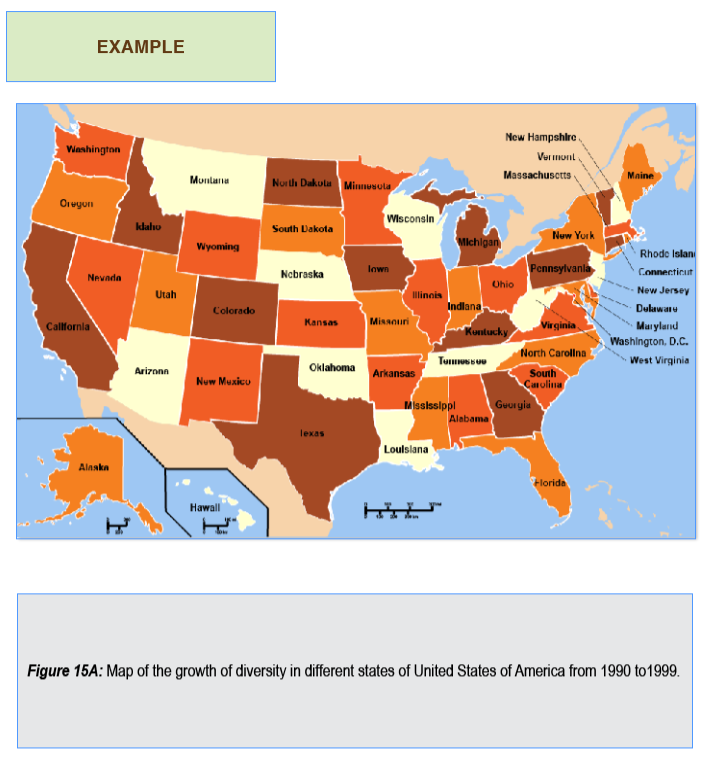
Example: Population Diversity Growth by State
Guidelines for Describing Maps
Tease out the dimensions
Maps are information dense and sometimes encode spatial relationships that aren’t always connected with linear coordinates or proximity. As with other complex images describe methodically, but consider making multiple passes for each “layer” of data.
Share the visual insights
Data visualizations using maps are exclusively visual. Describe trends and phenomena gleaned from this practice.
Combine with other alternatives
Maps are often a dataset arranged spatially. Consider including the underlying data. Use lists for features and points of interest.
Alternative Format Options
Text description provides overview and key patterns.
This map illustrates the growth of diversity in different U.S. states from 1990 to 1999. The map color codes each state into four categories depending on the level of increase in Latino, African American and Asian populations in their state. The map shows that all levels are distributed relatively evenly across all regions, with some notable concentrations in the West, around the Great Lakes and the South. Almost no bordering states are the same color.
- Low - 11 states
- Fair - 9 states
- Moderate - 12 states
- High - 11 states
Data tables can be created in a variety of ways. They can, but don’t always need to reflect the exact data of the visualization. Consider your objectives.
| Growth Level | Number of States | States |
|---|---|---|
| Low | 11 | Montana, Arizona, Nebraska, Oklahoma, Wisconsin, Louisiana, Tennessee, West Virginia, New Jersey, New Hampshire, Hawaii |
| Fair | 9 | Oregon, Utah, South Dakota, Missouri, Mississippi, Indiana, New York, North Carolina, Alaska |
| Moderate | 12 | Washington, Wyoming, Nevada, New Mexico, Kansas, Minnesota, Illinois, Arkansas, Ohio, Virginia, South Carolina, Alabama |
| High | 11 | California, Idaho, Colorado, North Dakota, Texas, Iowa, Michigan, Kentucky, Georgia, Vermont, Pennsylvania |
| Region | Low Growth | Fair Growth | Moderate Growth | High Growth |
|---|---|---|---|---|
| West | Arizona, Montana | Oregon, Utah | Nevada, New Mexico, Washington, Wyoming | California, Colorado, Idaho |
| Midwest | Nebraska, Wisconsin | Indiana, Missouri, South Dakota | Illinois, Kansas, Minnesota, Ohio | Iowa, Michigan, North Dakota |
| South | Louisiana, Oklahoma, Tennessee, West Virginia | Mississippi, North Carolina, FLorida | Alabama, Arkansas, South Carolina, Virginia | Georgia, Kentucky, Texas |
| Northeast | New Hampshire, New Jersey | New York | None Listed | Pennsylvania, Vermont |
| Non-Contiguous | Hawaii | Alaska | None Listed | None Listed |
| Region | Low | Fair | Moderate | High |
|---|---|---|---|---|
| West | 18% | 18% | 37% | 27% |
| Midwest | 17% | 25% | 33% | 25% |
| South | 31% | 15% | 31% | 22% |
| Northeast | 40% | 20% | 0% | 40% |
| Non-Contiguous | 50% | 50% | 0% | 0% |
Nested List might be helpful for answering questions.
- Low growth:
- Montana
- Arizona
- Nebraska
- Oklahoma
- Wisconsin
- Louisiana
- Tennessee
- West Virginia
- New Jersey
- New Hampshire
- Hawaii
Where to Place the Description
Give the description a heading and reference it in the alt text, or otherwise make sure the relationship between the description and image is clear. If the description is placed at the end of the document use #heading reference links to move back and forth.