Bar Charts
Example: Bar Chart
Guidelines for Describing Bar Charts
Provide x and y axis labels and titles
Describe what the graph measures
Is there something that the title doesn’t capture?
Explain the data on each axis and summarize thrends
The purpose of charts. What is able to be gleaned from this image?
Provide specific values
List the extents, or anomalies. If the data is available or simple to recreate, put it in a list or a table.
Alternative Format Options
Text description with a list.
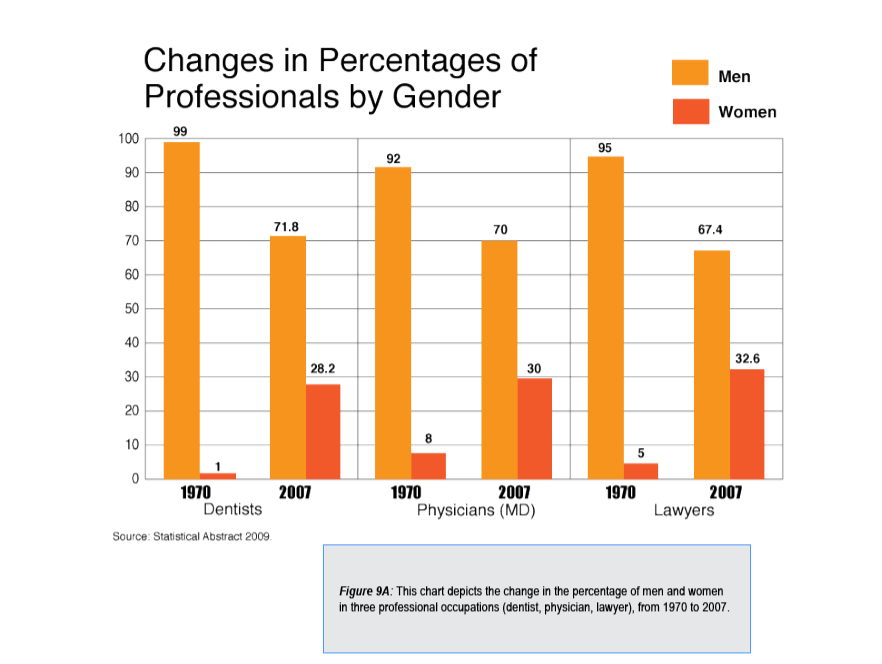
Figure 9A is a bar chart that illustrates the change in percentage of men and women who work in three professional occupations: dentists, physicians, and lawyers in U.S. between 1970 and 2007. Women working in all three professional careers dramatically increased.
- Dentists: Men 99% (1970), 71.8% (2007); Women 1% (1970), 28.2% (2007)
- Physicians: Men 92% (1970), 70% (2007); Women 8% (1970), 30% (2007)
- Lawyers: Men 95%(1970), 67.4% (2007); Women 5% (1970), 32.6% (2007)
Data tables are ideal when students need to work with the actual values.
| Professions | 1970 | 2007 |
|---|---|---|
| Dentists | Men 99% Women 1% | Men 71.8% Women 28.2% |
| Physicians (MD) | Men 92% Women 8% | Men 70% Women 30% |
| Lawyers | Men 95% Women 5% | Men 67.4% Women 32.6% |
Note: As above, tables can be simplified for readability. Keep in mind row and column headers can prepend the cells information in a screen reader.
Common Mistakes to Avoid
- Describing visual attributes — “The orange bars”
- Omitting axis labels — Always specify units of measurement
- Ignoring the comparison — Bar charts exist to compare; state what the comparison reveals
Where to Place the Description
Give the description a heading and reference it in the alt text, or otherwise make sure the relationship between the description and image is clear. If the description is placed at the end of the document use #heading reference links to move back and forth.